

Vigor Habits
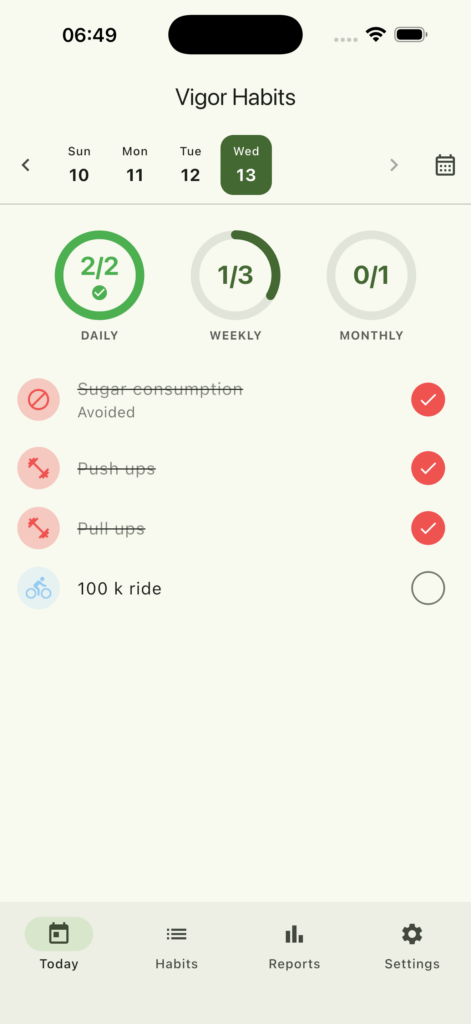
Three cadences. One glance.
Daily routines, weekly targets and monthly goals — each tracked separately, each shown on its own ring at the top of Today.
Everything Pro unlocks
One purchase. No subscription. Updates included for life.
Custom categories
Group habits your way with custom names, colors and icons. The Habits tab groups by section automatically.
Smart reminders
Per-habit notifications at the time and days you choose. Survives reboots; never spams the rest of your day.
Advanced analytics
Best day of the week, time-of-day patterns, monthly trends and the longest streak across all your habits.
Vacation mode
Pause a habit until you’re back. Streak intact. No “you missed 7 days” anxiety when you return.
Quantitative tracking
“10 push-ups”, “8 glasses of water”, “30 minutes reading”. Set a target, watch the ring fill in.
Good and bad habits
Avoid mode flips the success condition — you confirm what you successfully didn’t do. Track the build and the break side by side.
No subscription. Ever.
Support
How can we help?
Common answers below. If you can’t find what you need, just email us — we read every message.
Direct support
marek@buggygames.cloud
We aim to reply within 2 business days. Include your device model and iOS/Android version if you’re reporting a bug.
Frequently asked questions
How do I restore my Pro purchase on a new device?
Open Settings → Vigor Pro → Restore purchase. You must be signed in with the same Apple ID (iOS) or Google account (Android) that made the original purchase. There’s no recurring charge — Vigor Pro is a one-time buy that follows your account.
My iCloud sync isn’t working
Check that you’re signed into iCloud in iOS Settings → [Your Name] → iCloud, and that iCloud Drive is enabled. Vigor Habits stores sync data in your private iCloud Drive folder — no third-party server is involved. In the app, go to Settings → Cloud Sync and tap the sync button to force a fresh round-trip.
My reminder notifications don’t fire
Make sure notifications are enabled for Vigor Habits: iOS Settings → Notifications → Vigor Habits. On Android, also verify “Alarms & reminders” permission is granted under app permissions. In the app, confirm the habit has a reminder time set and at least one day-of-week selected.
What’s the difference between Build and Avoid habits?
Build habits are things you want to do — workout, read, meditate. Tap to mark complete on the day you do them.
Avoid habits are things you want to stop — sugar, late-night phone use, smoking. Tap to mark “successfully avoided” — usually the next morning, looking back at the day before. Use the calendar button on Today to jump to yesterday.
Why is my streak broken?
Streaks count calendar days, not hours. If you completed Monday at 11 pm and Wednesday at 1 am, the gap on Tuesday breaks the streak. Pro users can enable streak freeze tokens (Habits tab → edit habit → Streak freeze) to absorb 1–5 missed days per month without breaking the streak.
How do I export my data?
Pro feature. Open Settings → Manage → Export data → choose JSON (full snapshot) or CSV (habits + entries). The file is shared via the system share sheet — save to Files, email it, or send to Drive.
Can I sync between iOS and Android?
Not yet. iOS devices sync through iCloud Drive, Android devices sync through Google Drive — these are separate. Cross-platform sync is on the roadmap but isn’t shipped. If you switch platforms, use Export data to move your history manually.
How do I delete a habit?
Swipe left on the habit in the Habits tab and confirm “Archive”. Archived habits keep their history but no longer appear on Today or in active reports — you can restore them later. There’s no permanent-delete option, by design: it protects your historical streaks from accidental loss.
How do I cancel Vigor Pro?
Vigor Pro is a one-time purchase, not a subscription — there’s nothing to cancel. If you’d like a refund within Apple’s 14-day window, request it through reportaproblem.apple.com. On Android, refund through Google Play Console.
I found a bug or want to suggest a feature
Email us at marek@buggygames.cloud. For bugs, screenshots and your iOS/Android version are gold. For feature requests, the more specific the use case, the better — we read everything even if we can’t reply to every message.
Still stuck?
A real person reads every email. Say hello →